

Don't Conflate Automation with AI: An Executive's Guide to Intelligent Workflow Orchestration
Automation executes known rules; AI interprets ambiguity. Intelligent workflow orchestration combines both—without forcing a frontier model into every step
I’ve spoken with a lot of executives who come to me and say some version of the same thing: “We need AI.” That statement is understandable. AI is dominating boardroom conversations, investor narratives, product roadmaps, and operating plans. But when I ask a few clarifying questions, I often find that what they actually mean is something more specific: “We need to automate repetitive work, and we need AI to help with the judgment calls.” That distinction matters.
Because automation and AI are not the same thing. And when executives conflate the two, they risk overbuilding, overspending, and overcomplicating workflows that should be simple, deterministic, and inexpensive. Every roadmap deck in 2026 has an “AI” slide—but half the bullets describe automation that could have shipped years ago: if-this-then-that workflows, scheduled reports, RPA bots clicking through legacy UIs. That is not wrong work. Calling it AI sets false expectations on cost, risk, and time-to-value.
The future is not “AI everywhere.” The future is intelligent workflow orchestration: automation handling the repeatable work, AI handling the ambiguous work, and humans staying in the loop where accountability, judgment, and trust still matter.
Deterministic vs non-deterministic
The clearest way to separate automation from AI is to ask whether the work is deterministic or non-deterministic. A deterministic process gives you the same output every time you give it the same input and rules. Map a field, validate a format, route an approval when a threshold is met—the result should not change run to run. You can test it, audit it, and explain exactly why something happened.
A non-deterministic process does not guarantee identical outcomes. Language, messy documents, intent, tone, and context all shift the answer. AI systems are built for this kind of work—but their outputs are probabilistic. The same prompt can produce a different phrasing, a different classification, or a different recommendation on another pass. That is not a bug when you planned for it. It is a problem when leadership expected boring, repeatable reliability.
Executives who internalize this distinction avoid three expensive mistakes: frustration when a pilot “works in the demo” but behaves inconsistently in production because non-deterministic steps were never governed; cost when deterministic work is routed through models that charge per token instead of through workflows that charge once; and surprise when a step that should have been predictable produces an outcome nobody can defend to a customer, auditor, or board. Match the tool to the nature of the work—deterministic rails for execution, non-deterministic intelligence where interpretation actually creates value—and expectations, budgets, and operating models stay aligned.
Automation is not AI
Automation is not new. Companies have been automating business processes for decades. Long before today’s AI boom, enterprises were using tools like Microsoft SQL Server Integration Services, Informatica, scheduled jobs, and ETL pipelines to move data, transform records, trigger notifications, and keep systems synchronized.
Automation is best when the rules are known. Classic automation optimizes known paths—inputs are structured, rules are explicit, outcomes should be identical run to run. Success metrics are cycle time, error rate, and labor removed, not “did the model surprise us in a good way.”
- A customer submits a form; a record is created in the CRM
- A notification is sent to the account manager; a task is assigned
- A report is generated; an invoice is created
- A dataset is moved from one system to another
None of that necessarily requires AI. It requires logic, triggers, mappings, permissions, error handling, and workflow design.
AI, on the other hand, is most valuable when the work involves ambiguity, interpretation, summarization, classification, reasoning, language, context, or judgment. Outputs are probabilistic. Guardrails, evaluation, and human review are part of the product—not polish added after launch.
- Understanding the intent of an email
- Extracting messy data from an attachment
- Classifying a support ticket or summarizing a contract
- Determining whether an exception needs escalation
- Recommending the next best action or generating a response for human review
- Identifying anomalies that do not fit a clean rule
Automation follows instructions. AI interprets context. The mistake is assuming every automated step needs AI. It doesn’t.
Why the conflation hurts
- Budget: AI-priced vendors get scoped for rule-based work you could ship cheaper with workflow tools
- Talent: Engineers build prompt chains where a SQL job and a queue would suffice
- Trust: One hallucination poisons an initiative leadership expected to be boring and reliable
- Compliance: Non-deterministic outputs in regulated flows without a control story becomes a board-level incident
A cautionary tale: the half-billion-dollar mistake
When organizations use AI to automate instead of orchestrate, the bill can outrun the strategy overnight. Fast Company recently reported on an enterprise that ran up roughly $500 million in Claude spend in a single month—not because the company had a bold AI strategy, but because it treated generative AI as a blanket automation layer. Employees had uncapped license access; nobody watched the meter. Deterministic work that should have been workflows—reportedly including tasks as simple as checking the weather—was routed through frontier models. Agentic loops that could have been rules, triggers, and cheaper classification steps consumed orders of magnitude more tokens than a single chat.
That is the opposite of intelligent workflow orchestration: automation handling repeatable execution, AI reserved for interpretation, governance on spend and access. The underlying story, first surfaced by Axios, reads like early cloud déjà vu—unlimited use, no accountability, a finance team reverse-engineering the damage. Fast Company notes Microsoft scaling back Claude Code licenses and Uber burning through its 2026 Claude budget by April, with leadership questioning whether usage scaled with customer value. The lesson is not “avoid AI.” It is stop conflating automation with AI—orchestrate the workflow, route models by task, and cap variable cost before it runs away. $500 million in a month is extreme. The same mistake at a smaller scale is still expensive.
The cost problem: not every task deserves the most powerful model
If everything in a workflow is handled by AI—especially by the most capable frontier models—the cost can become absurd very quickly. This is one of the most underappreciated issues in enterprise AI adoption. Executives often think about AI cost as a software subscription problem. But in many production use cases, AI cost behaves more like cloud infrastructure, metered usage, or transaction processing. Every prompt, every document, every workflow step, every retry, every agentic loop, and every generated response can consume tokens.
Now multiply that across thousands of customers, millions of records, or high-frequency operational processes. Suddenly, “we need AI” becomes “we accidentally created a variable cost engine with no governor.”
This is why model selection matters. You do not use the most expensive, most capable model for every step. You route work based on the difficulty, risk, and judgment required. Some tasks need a frontier reasoning model. Some need a strong middle-tier model. Some need a fast, cheaper model that simply follows instructions. Some tasks do not need AI at all.
In the Anthropic world, that means thinking carefully about when to use an Opus-class model, when to use Sonnet, and when Haiku is sufficient. In the OpenAI world, that means making similar decisions between frontier reasoning models, general-purpose models, and smaller faster models. Do not buy intelligence by default. Assign intelligence where it creates leverage. Price and staff each lane honestly—copilots are not a substitute for integration discipline.
Automation tools are the new operating layer
The good news is that today’s automation ecosystem is better than ever. Tools like n8n, Temporal.io, Zapier, Activepieces, Pipedream, and Make give companies the ability to connect applications, trigger workflows, transform data, call APIs, route approvals, and integrate AI models into business processes without rebuilding every workflow from scratch.
These tools are not replacing enterprise software. They are becoming the connective tissue between systems. They sit between email, spreadsheets, CRMs, ERPs, databases, ticketing systems, SaaS platforms, internal tools, APIs, and AI models. They allow businesses to build workflows around how work actually happens—not just how one system thinks work should happen.
Most companies do not have one clean system of record for every process. They have messy operational reality: customers send spreadsheets, vendors email PDFs, finance works in QuickBooks or NetSuite, sales lives in HubSpot or Salesforce, operations tracks exceptions in spreadsheets, and developers expose APIs. Automation tools help connect this mess. AI helps interpret it. Together, they create something much more powerful than either one alone.
Intelligent workflow orchestration
When you combine workflow automation, AI, and event-driven triggers, you get intelligent workflow orchestration—the practical version of AI transformation. Not a chatbot bolted onto your website. Not a vague enterprise AI strategy. Not a hackathon demo.
- Automation handles repeatable steps
- AI handles interpretation and judgment
- Events trigger the workflow; rules route the process
- Humans review exceptions; systems update automatically
- Data flows across the organization with observability and auditability
This is where AI becomes operational. It turns business events into business outcomes. Many mature products need both layers: automation for the rails, AI for the edges.
The diagram below is deliberately simple—and that is the point. Orchestration is not “AI every step.” It is a chain of trigger, interpretation, and routed execution.
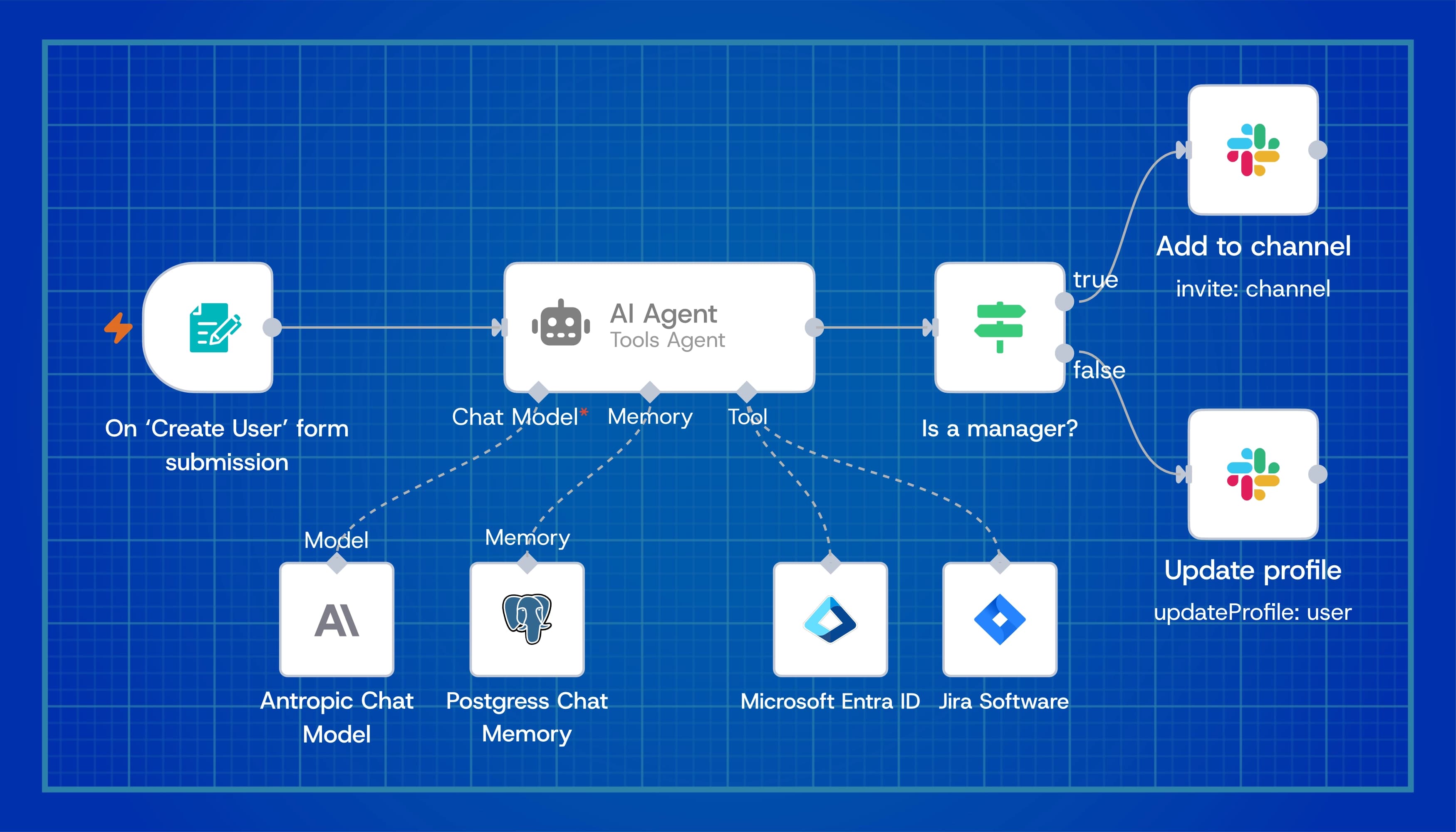
Example n8n walkthrough
- Trigger: a form submission starts the workflow
- Agent: Ai Agent only used to interpret intent
- Decision point: does this person want to join a channel or update their profile
- Automation: routes the true/false outcome to the correct deterministic action (add channel or update user record) without sending every step through a frontier model
- Notification: keeping people updated on state changes
Another common scenario: the customer spreadsheet problem
Consider a common back-office scenario. A client emails one of your employees an Excel file. The employee downloads it, reviews the columns, cleans formatting, validates data, maps fields to your internal system, fixes errors, uploads the data, checks whether it worked, sends confirmation, and creates follow-up tasks. This happens in finance, operations, logistics, healthcare, insurance, onboarding, compliance, procurement, and professional services. It is not glamorous—but it is everywhere.
With intelligent workflow orchestration, the process can become much smarter—not by “AI-ing the whole thing,” but by using AI surgically inside a well-designed workflow:
- A customer email arrives with an attachment; the workflow is triggered automatically
- Automation checks file type, sender, customer record, and required metadata
- AI reviews the spreadsheet structure and identifies what the columns appear to represent
- Automation compares the data against known schema requirements
- AI flags ambiguous fields, missing values, unusual patterns, or likely mapping issues
- A cheaper model handles routine classification; a more capable model is used only if data is messy, ambiguous, or high risk
- The system generates a proposed import plan; a human reviews exceptions if needed
- Approved records are pushed into the platform through an API; the customer receives confirmation
- The workflow logs the action for auditability
The executive decision framework
Before you label an initiative “AI,” ask: Is the correct answer knowable from data we already trust? If yes, start with automation. Ask next: Does quality depend on context, tone, or synthesis across sources? If yes, design for AI—with evals, fallbacks, and ownership. Then work through these six lenses:
1. Is the task deterministic?
If the task follows clear rules, use automation—moving files, updating records, sending notifications, creating tasks, syncing systems, validating required fields, or routing approvals based on known conditions. Do not use AI where rules are sufficient. Automation fails closed; AI fails open unless you design otherwise.
2. Does the task involve interpretation?
If the task requires understanding language, documents, intent, context, or messy human input, AI may be appropriate—reading emails, interpreting PDFs, classifying requests, summarizing conversations, extracting unstructured data, or determining whether something looks unusual. Use AI where interpretation creates leverage.
3. Does the task require judgment?
If the task involves a decision that could affect customers, money, compliance, security, legal exposure, or brand trust, AI should support the decision—not blindly own it. Use human-in-the-loop review for high-impact decisions.
4. What is the cost of being wrong?
Low-risk workflows can tolerate more automation. High-risk workflows need escalation, logging, review, and governance. The higher the risk, the more intentional the orchestration needs to be.
5. What model is actually required?
Not every AI task needs the strongest model. Use small models for simple extraction, classification, formatting, and routing. Use middle-tier models for summarization, synthesis, and structured reasoning. Use frontier models for complex judgment, multi-step reasoning, strategic analysis, or high-value exceptions. Model routing is now an executive cost-control discipline.
6. Can the workflow improve over time?
The best workflows create feedback loops. Every human correction, rejected recommendation, exception, escalation, and approved output should become part of the improvement cycle. That does not always mean retraining a model. Sometimes it means improving prompts, rules, mappings, validations, or escalation logic. AI strategy is not just model strategy—it is workflow learning strategy.
Why this matters for the business
The companies that win with AI will not be the ones that randomly sprinkle AI into every process. They will be the ones that redesign work—understanding where automation is enough, knowing where AI adds leverage, controlling model cost, preserving human accountability, and building workflows that are observable, auditable, and continuously improving.
This is the difference between AI experimentation and AI operations. Many organizations are still stuck in the experimentation phase—testing tools, running pilots, building internal chatbots, asking employees to “find use cases.” That is useful, but it is not enough. The next phase is operationalization: how does a customer request become a completed action? How does a document become structured data? How does an exception get reviewed? How does the business know what happened? Those are workflow questions—and that is where AI becomes real.
The new executive mandate
Executives do not need to become AI engineers. But they do need to understand the operating model. Stop asking, “Where can we use AI?” A better question is: “Where does our work get stuck because people are manually interpreting, moving, validating, or deciding things across disconnected systems?”
Then ask: “What parts of that workflow should be automated, what parts require AI, what parts require human review, and what parts should be governed by policy?” That is intelligent workflow orchestration—and a much more useful conversation than simply saying, “We need AI.” Separate roadmaps: automation backlog vs AI backlog, different owners and KPIs.
Final thought
Automation is about execution. AI is about interpretation. Orchestration is about making them work together. The companies that understand this distinction will build faster, cheaper, smarter, and more resilient operations. The companies that do not will spend too much money forcing AI into places where simple automation would have worked better.
The goal is not to replace every workflow with AI. The goal is to design workflows where automation does what it does best, AI does what it does best, and humans stay focused on the decisions that matter most. That is the real path to enterprise AI value.
Curated reading
- Company spent $500M on Claude in a single month: AI costs climbHow uncapped Claude access and AI-as-automation reportedly produced a $500 million monthly bill—and why orchestration, not blanket model usage, is the antidote.
- n8n — workflow automationOpen workflow automation for connecting apps, APIs, and AI models—the kind of orchestration layer this article diagrams in practice.
- Temporal — durable workflow executionPlatform for reliable, long-running workflows with retries, state, and observability when automation needs to survive failures at scale.
- Activepieces — open-source automationSelf-hostable automation builder for teams wiring triggers, actions, and AI steps without treating every task as a frontier-model problem.